

Replacement for HP 923 Ink Cartridges 4-Pack, Work with OfficeJet Pro 8120e 8130e 8122e 8135e 8138e 8139e Printer, 923 Ink Black/Cyan/Magenta/Yellow (No Chip, Use Original Chip)
US$15.99
Price when purchased online
Free shipping
Free 30-day returns
Sold and shipped by laextra.mx
We aim to show you accurate product information. Manufacturers, suppliers and others provide what you see here.
US$15.99
Price when purchased online
Free shipping
Free 30-day returns
Sold and shipped by laextra.mx
Free 30-day returns Details
Product details
| Management number | 229370605 | Release Date | 2026/05/31 | List Price | US$15.99 | Model Number | 229370605 | ||
|---|---|---|---|---|---|---|---|---|---|
| Category | |||||||||
- This chip-free ink cartridge set is compatible with HP OfficeJet Pro printers including 8120e, 8122e, 8123, 8130, 8130e, 8135e, 8138e, 8139e. Note: Requires reuse of original HP 923 chips from your previous cartridges. Match your printer model before ordering
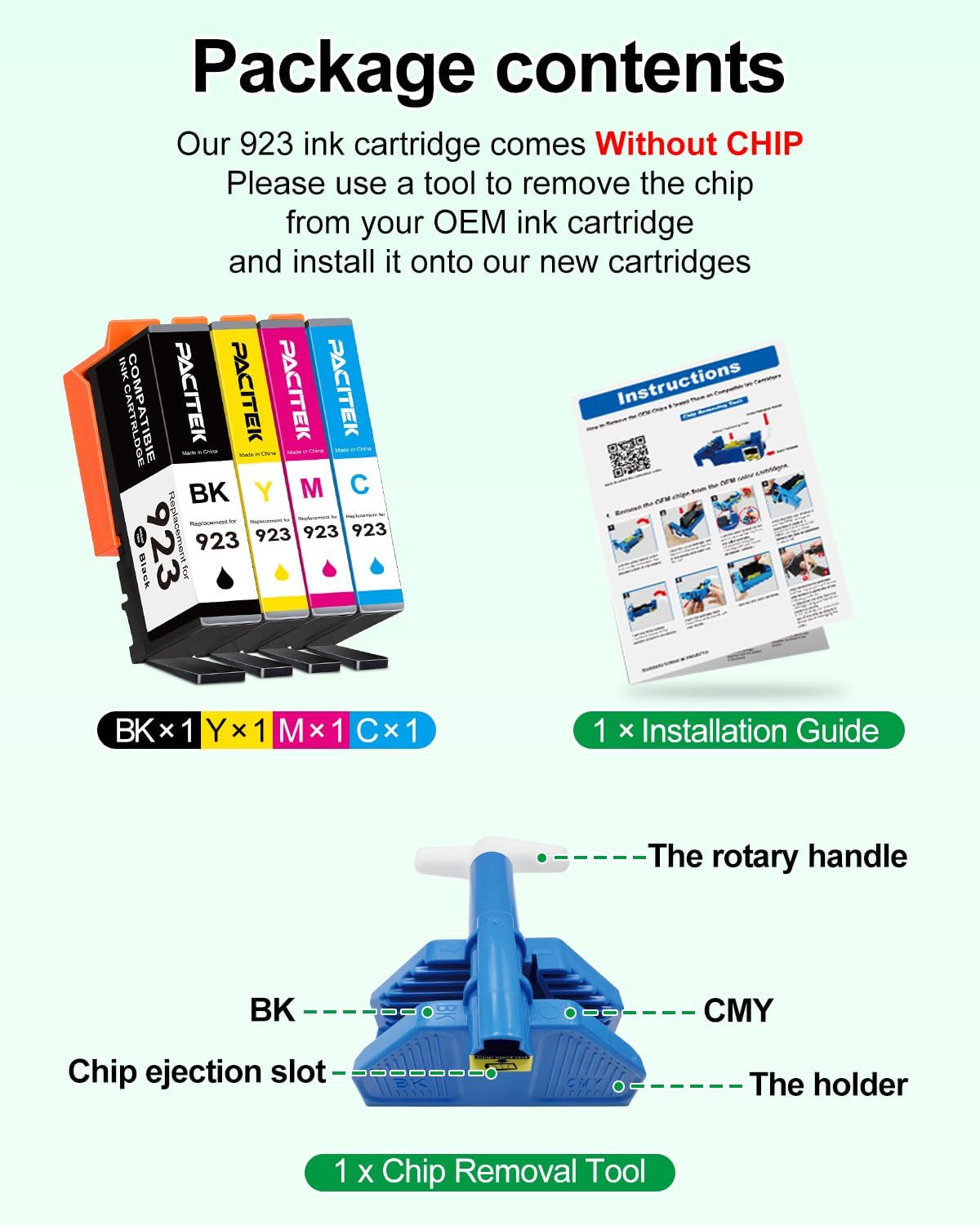
- [Package Contents] Includes 1 x Black, 1 x Cyan, 1 x Magenta, 1 x Yellow 923-compatible ink cartridge, 1 x chip remover tool, and 1 x detailed installation guide
- [Page Yield] Black cartridge yields up to 500 pages; each color cartridge yields up to 400 pages, based on 5% coverage (A4/Letter). Actual yield varies by coverage and content
- [Print Performance] Designed to deliver sharp, clear text and vibrant color output with consistent ink flow, helping reduce smudging for everyday documents, reports, and photos
- Please note that these 923 ink cartridges are NOT equipped with chips.To use them, please follow these simple steps using the included Chip Transfer Tool: Remove: Use the tool to take the original chips off your used OEM cartridges. Transfer: Install the original chips onto the corresponding new cartridges (make sure the colors match). Insert: Place the new cartridges into their correct printer slots, and you are ready to go!
- [Tips & Support] For installation, use the included tool to remove chips from original cartridges, peel the protective tape from new cartridges, and attach the reused chips. Refer to the included guide for detailed steps. Technical Support is available if needed


| ASIN | B0GPWPF3GJ |
|---|---|
| Brand | PACITEK |
| Color | PCH9234PV2BKCMY |
| Ink Base | Water |
| Ink Colour | Black Cyan Magenta Yellow |
| Model Name | PT-PC-H9234PV2 |
| Page Yield | 500 |
| Unit Count | 1.0 Count |
| Print media | Paper (plain) |
| Manufacturer | PACITEK |
| Model Number | PT-PC-H9234PV2 |
| Model Series | OfficeJet Pro |
| Printer Type | Inkjet |
| BuiltIn Media | 1 x Black ink cartridge, 1 x Cyan ink cartridge, 1 x Magenta ink cartridge, 1 x Yellow ink cartridge, 1 x chip remover tool, 1 x detailed installation guide |
| Cartridge Type | Compatible |
| Mfr Part Number | PCH9234PV2BKCMY |
| Number of Items | 4 |
| Compatible Devices | HP OfficeJet Pro 8120e, 8122e, 8123, 8130, 8130e, 8135e, 8138e, 8139e |
| Printer Output Type | multiple colors |
| Warranty Description | 2 Years |
| Compatibility Options | Compatible |
| Compatible Printer Models | HP OfficeJet Pro 8120e 8122e 8123, HP OfficeJet Pro 8130 8130e 8135e 8138e 8139e |
| Item Dimensions D x W x H | 5"D x 2"W x 4"H |
| Specific Uses For Product | Home office printing, Small business printing |
| Printer Model Compatibility | HP OfficeJet Pro 8122e, HP OfficeJet Pro 8135e, HP OfficeJet Pro 8139e |
| Other Special Features of the Product | High Yield |


Bestseller ranking
Inkjet Ink Cartridges


Correction of product information
If you notice any omissions or errors in the product information on this page, please use the correction request form below.
Correction Request Form